Burp AI Features: A Practical Guide for Better Web Security Testing

Robin Joseph
Senior Security Consultant

Ever spent hours manually testing the same vulnerabilities over and over?
I have. For years.
Then Burp Suite Professional 2025.2 dropped something that actually changed how I work. Not just another AI feature bolted on top—this one’s built differently.
Burp AI doesn’t try to replace you. It makes you better.
Think of it as your testing sidekick—always alert, never tired, and getting smarter with every scan. Built right into the tool you already know, so there’s no learning curve. And it all runs within
PortSwigger’s secure infrastructure—no cloud, no data leaks, no training someone else’s model with your findings.
What makes Burp AI stand out?
It actually helps you test smarter. Not with gimmicks, but with features that save you hours:
- It exploits vulnerabilities automatically
- Explains confusing requests on the fly
- Filters out noisy false positives
- Handles tricky logins in one click
- Lets you build your own AI tools without managing APIs
Modern apps are messy—APIs calling APIs, JS everywhere, complex auth flows. You need AI that understands that. Burp AI does.
Security testing isn’t getting easier. But now, your tools finally are.
What is Burp AI and Why It Matters
Burp AI is PortSwigger’s intelligent assistant, built directly into Burp Suite Professional. But unlike traditional rule-based scanners, it doesn’t just follow a script—it learns and adapts.
This isn’t some cloud-based, black-box system. Burp AI runs locally within your trusted environment. Your data stays private. No uploading findings to train someone else’s model. It uses machine learning to enhance your workflow—automating repetitive tasks, uncovering complex issues, and letting you focus on what really matters.
Why does that matter?
Because modern web apps are messier than ever. JavaScript-heavy frontends, APIs talking to APIs, complex authentication flows—traditional scanners just can’t keep up. Manual testing is still the gold standard, but it’s slow and doesn’t scale.
Burp AI fills that gap. It amplifies your skills, augments your findings, and accelerates your process. You stay in control, but with an intelligent assistant that helps you test smarter—not just harder.
It’s not about replacing testers.
It’s about helping them go faster, deeper, and more efficiently in a world where complexity is only growing.
Core Burp Suite AI Features Explained
Burp Suite just got five new superpowers. Not the flashy kind that look good in demos. The kind that actually save you hours every week.
These are the features that make Burp AI more than just a scanner—this is where the time savings and testing power really kick in:
- AI-powered vulnerability detection
- Real-time request analysis with Burp GPT
- Adaptive scanning using machine learning
- Reduced false positives through smart filtering
- Integration with traditional Burp Suite tools
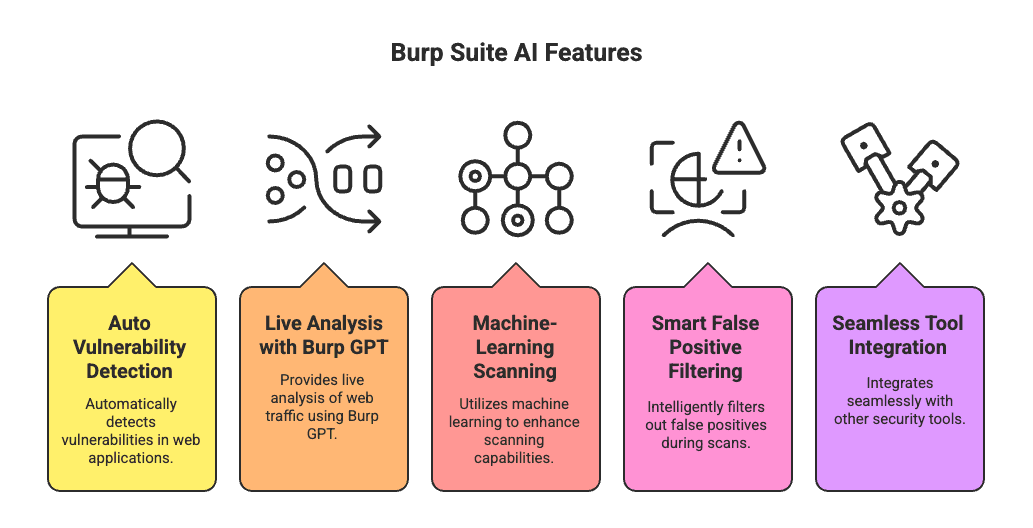
Let’s dive into each:
1. AI-powered Vulnerability Detection
Explore Issue acts like a junior pentester that never gets bored.
Click once, and it automatically tries to:
- Exploit the vuln you found
- Identify related attack vectors
- Build proof-of-concept payloads
- Map out escalation paths
All actions are transparent—you see what it’s doing and why.
Cost: 400–1,000 AI credits per run (about €0.20–€0.50). Way cheaper than your coffee.
2. Real-Time Request Analysis with Burp GPT
Burp GPT, once a fan-made extension, is now fully native.
Point it at any HTTP request or response, and it:
- Spots vulnerabilities in real time
- Covers OWASP Top 10 issues without special training
- Highlights confusing parts (headers, cookies, JS)
- Explains them instantly—no more Googling
The Explainer feature is like having a built-in security search engine, fine-tuned for Burp users.
3. Adaptive Scanning Using Machine Learning
Burp AI gets smarter the more you use it.
It uses LSTM (Long Short-Term Memory) algorithms to:
- Learn from previous scans
- Spot complex issues like SQLi, CSRF, XXE
- Improve detection accuracy over time
- Tailor its recommendations to your workflow
Instead of repeating static rules, it adapts to the web apps you’re actually testing.
4. Reduced False Positives Through Smart Filtering
False positives kill productivity. Burp AI helps by:
- Automatically filtering out noisy, irrelevant findings
- Focusing first on tricky cases like Broken Access Control
- Reducing clutter in your reports
You’ll still want to keep tools like Autorize for semi-automated checks, but Burp AI makes a big dent in the noise.
5. Integration with Traditional Burp Suite Tools
Everything runs inside the Montoya API framework—no need to manage API keys or external setups.
Your custom extensions can tap into Burp AI’s power seamlessly, without leaving Burp’s secure sandbox.
You decide when to use AI and when to go full manual.
Nothing’s locked behind complexity. Just smarter testing, built in.
Burp GPT: Your Built-In Security Assistant
Burp GPT started as a community-built extension. Now, it’s fully integrated into Burp Suite Professional—offering AI-powered insights exactly where you need them: inside your HTTP traffic.
Whether you're examining a complex JavaScript payload or trying to make sense of obscure headers, Burp GPT gives you real-time clarity without the tab-switching, guessing, or copy-pasting.
Here’s what it actually helps you do:
- Analyze raw HTTP requests and responses on the fly
- Flag OWASP Top 10 vulnerabilities—even when they’re buried deep
- Offer clear, instant explanations for tricky headers, cookies, parameters, or payloads
- Understand application behavior without needing to Google every five minutes
You can even highlight specific parts of a request—Burp GPT’s Explainer feature will break it down into plain language you can act on immediately.
Whether you're debugging, exploring, or validating a finding, it’s like having a knowledgeable teammate right in the tool—quiet, fast, and always ready.
How Burp AI Enhances Web Security Testing
Modern web applications are growing more complex—dense JavaScript, API-heavy architectures, multi-step authentication. Traditional scanners struggle to keep up, and manual testing alone doesn’t scale.
Burp AI helps you close that gap. It combines automation with real-world awareness, making your testing faster, sharper, and more efficient.
1. Faster Identification of Complex Vulnerabilities
Manual exploitation used to eat up hours—crafting payloads, testing variations, building PoCs. Now? Explore Issue does it all in minutes.
Once Burp flags something, the AI:
- Tries multiple exploit techniques
- Builds working PoCs
- Follows hidden attack paths
I tested it on a client’s e-commerce site. Found an access control bug, ran Explore Issue, grabbed coffee—came back to a full exploitation report with impact and escalation paths. Even multi-factor flows and tricky login sequences? Handled in one click.
2. Improved Accuracy in Large-Scale Scans
At scale, accuracy is everything. Burp AI is particularly effective in reducing noise from common problem areas like Broken Access Control—where traditional scanners often over-report.
It thinks before flagging:
- Checks if a page is truly private
- Tests access from unauthenticated users
- Only reports if it's confident
In a recent scan of 800+ endpoints, Burp AI flagged 47 real, verified issues. No ghost chasing—just actionable findings you can fix.
3. Predictive Threat Modeling Capabilities
Finding bugs is one thing. Understanding how attackers could use them is another. Burp AI connects those dots for you.
It:
- Analyzes attack chains
- Highlights real-world impact
- Recommends next steps
I saw it turn a "low-severity" info disclosure into a chained exploit via timing attack. That kind of insight isn’t just smart—it’s essential.
Traditional tools find bugs.
Using Burp AI Plugins and Extensions
Want to supercharge your security testing even more?
The BApp Store is where the magic happens. And the best part? You don't need to be a coding wizard to use these AI-powered extensions.
Accessing the BApp Store for AI plugins
Want to level up your Burp AI setup? Start with the BApp Store—your hub for AI-powered plugins.
Getting there is easy:
- Go to
Extensions > BApp Store - Search for keywords like “AI” or “machine learning”
- Use filters like Featured, Recently Updated, or PortSwigger Created to find high-quality options
Before installing, review the system impact ratings for each extension:
- Memory usage
- CPU load
- Time and scanner performance
- Overall resource impact
Because nobody wants their Burp Suite lagging mid-test.
Pro tip: Follow @BApp_Store on Twitter to stay updated on new drops.
Recommended Burp AI plugins for Automation
Not all AI plugins are created equal. Look for ones built on the Montoya API—these are designed to work seamlessly with Burp’s AI engine.
Recommended plugin types include those that:
- Auto-analyze HTTP traffic
- Detect vulns your scanner might miss
- Explain unusual behaviors in responses
- Automate the tedious tasks you dread
Early examples like Shadow Repeater showed promise and paved the way for more powerful automation tools. New AI plugins are appearing regularly as the ecosystem matures—keep an eye out.
How to Install and Configure Burp Suite AI plugins
You have two installation options:
1. Direct Installation (preferred):
- Go to
Extensions > BApp Store - Select your plugin
- Click Install
2. Manual Installation (for offline setups):
- Download the
.bappfile from the PortSwigger site - In Burp, go to
Extensions > BApp Store→ click the import icon - Select Import BApp file
- Choose your downloaded plugin
Once installed, don’t forget to enable AI access:
- Head to
Extensions > Installed - Find your plugin
- Check the Use AI box
This gives you control over when plugins use AI credits. Complex tasks consume more credits, and Burp shows usage per extension—so you’re never in the dark.
Monitor your balance using the AI icon (bottom-right), and manage credits wisely for maximum testing efficiency.
Managing Burp AI Credits and Usage
Burp AI is powerful—but like any smart tool, it comes with resource limits.
To keep usage transparent and flexible, PortSwigger introduced a credit-based system. This lets you control how and when AI features are used, based on what your workflow needs.
What are Burp Suite AI credits?
Burp AI credits are the currency you use to power AI features inside Burp Suite. Every user starts with 10,000 free credits, worth about $5, which lets you try out all the core functionality without spending a cent.
Some key things to know:
- Credits are available in Professional 2025.2+ only
- They expire after 12 months
- Credits are per user—no sharing
- Your current balance is shown via the AI icon (bottom-right corner)
Once you run out, you can top up through your PortSwigger account.
How Credits are Consumed during Scans
Credit usage depends on the complexity of the task:
-
Explainer (highlight + explain): minimal credits
-
Shadow Repeater: ~2–4 credits per interaction
-
AI HTTP Analyzer: ~18 credits
-
Full vulnerability exploration: 400–1,000 credits
(Roughly €0.20–€0.50 per investigation)
If you run out mid-scan, AI features will pause automatically. You can configure whether to:
- Continue the scan without AI
- Halt entirely until you top up
You’re always in control of how and when credits are used.
Tips to Optimize Credit Usage
Want to stretch your credits further? Try these proven tips:
-
Keep responses short: Smaller payloads = lower credit burn
-
Use caching: Cache prompt results and reuse them when possible
-
Strip sensitive data: Remove tokens and session cookies before sending
-
Focus on in-scope traffic: Don’t waste credits on noise
-
Use structured formats like JSON: Reduces prompt injection risks and improves AI response quality
-
Run async tasks: Use an executor service to avoid blocking Burp during AI processing
Bottom line: 10,000 free credits go a long way if you’re smart about how you use them. But for daily deep testing, expect to top up.
The good news? You decide when AI kicks in—and exactly what it’s costing you.
Best Practices for Getting the Most from Burp AI
After watching hundreds of security pros either waste credits or uncover critical vulnerabilities, I’ve learned one thing: it all comes down to setup.
1. Define Clear Scope Before Scanning
Scoping with Burp AI isn’t optional—it’s essential. Without it, you’ll burn credits analyzing irrelevant traffic.
Start smart:
- Right-click target sites in the Site Map → Add to scope
- Enable "Show only in-scope items" to filter out noise
- Create precise include/exclude lists
- Use protocol, host, port, and file path controls for deeper targeting
The tighter your scope, the better your results—and the fewer credits you’ll waste.
2. Combine Manual and AI-assisted Testing
AI should be your assistant, not your replacement.
Here’s how to get better results:
- Strip sensitive data before analysis
- Use JSON instead of raw text to avoid prompt injection
- Set low temperatures (0.0–0.8) for accuracy
- Use higher temps (0.8–2.0) for creative exploration
Think of Burp AI like a junior analyst. The clearer your prompts, the better its output.
3. Integrate Burp AI into CI/CD Pipelines
Using Burp AI in your CI/CD workflow is a game changer:
- Use the pre-built CI/CD driver
- Run site-driven scans on pull requests, new commits, or nightly builds
- Automate scope selection directly from your site tree
This turns AI-powered security testing from a manual chore into a continuous, scalable process.
Bottom line: Set clear scope, write smart prompts, and automate what you can. That’s how you get real value from Burp AI—without wasting credits.
What’s Next for AI in Web Security
AI is no longer just a buzzword—it’s rapidly becoming the backbone of modern cybersecurity. Tools like Burp AI are already helping penetration testers find vulnerabilities faster and more accurately, but the real impact lies ahead. Future AI systems will go beyond reactive testing, anticipating threats, predicting attack patterns, and even suggesting remediation strategies before breaches occur.
This evolution doesn’t replace human expertise—it amplifies it. Security professionals will spend less time on repetitive scanning and more time analyzing complex threats that require judgment, context, and creativity. AI acts as a co-pilot, enabling teams to scale security efforts without compromising precision.
With this power come new challenges. Ethical considerations, like responsible AI use and avoiding over-reliance on automation, will be essential. Organizations must set clear guidelines to keep AI tools safe, transparent, and accountable.
Integrating Burp AI today is just the start. The future belongs to a hybrid approach—machines handling the heavy lifting, humans steering strategy and ethics. Those who embrace this synergy will stay ahead of evolving cyber threats.
The Bottom Line on Burp AI
When Burp AI was first announced, skepticism across the security community was expected. With so many tools claiming to be “AI-powered,” it felt like yet another marketing buzzword. But Burp AI has proven it’s more than that—it’s a meaningful evolution of how web security testing is done.
Rather than replacing testers, Burp AI augments their capabilities. Features like Explore Issue, Explainer, intelligent login handling, and smart false positive filtering make it feel less like a scanner and more like a teammate. It handles the repetitive, time-consuming parts—so testers can stay focused on strategy and impact.
The 10,000 free credits that come with Burp Suite Professional 2025.2+ offer plenty of room to experiment. With smart usage—like reducing payload sizes, reusing cached responses, and staying in-scope—testers can stretch that value even further.
Tasks that used to take hours, like validating multi-step auth or exploring access controls, now take minutes. The result? Faster findings, cleaner results, and more meaningful security insights.
Burp AI isn’t about flash. It’s about real-world efficiency—and it delivers.
Curious how AI-powered testing can streamline your security workflow? Talk to our team for a personalized demo tailored to your environment and goals.
Pentesting & Offensive Security