Recovery Point Objective (RPO): Data Loss and RTO

Robin Joseph
Senior Security Consultant

Ever wonder how much data loss would actually hurt your business?
When systems fail, the real damage isn’t the outage—it’s the gap between your last clean data and the moment everything broke. That gap determines whether recovery is a minor setback or a serious business incident.
Payment platforms, customer databases, and operational systems all feel data loss differently. Lose a few minutes in one place and nothing happens. Lose a few hours somewhere else and you’re dealing with revenue loss, compliance exposure, or broken customer trust.
This is where recovery planning stops being theoretical. Data loss tolerance drives how often you back up, how much you spend on infrastructure, and how quickly you can recover without painful trade-offs.
And it doesn’t exist in isolation. How much data you lose and how long you stay down together define your organization’s tolerance for disruption—long before a disaster ever happens.
Understanding Recovery Point Objective (RPO)
Recovery Point Objective (RPO) is defined as the maximum amount of data loss your business can tolerate when systems fail. It sets the boundary between a manageable incident and a serious business problem.
Not all data carries the same risk. Mission-critical systems—payments, customer records, core operations—usually need near-zero tolerance for data loss. Important operational data may allow a short window. Low-impact or reference data can often tolerate longer gaps without disrupting the business. Mature recovery strategies reflect these differences instead of forcing one RPO across every system.
RPO directly influences how often you back up data, where those backups live, and how much recovery will cost. Shorter RPOs mean more frequent backups, higher storage and infrastructure costs, and tighter operational discipline—but far less risk when things go wrong. Longer RPOs reduce cost but increase exposure.
Set RPO intentionally, and recovery becomes predictable. Ignore it, and you’ll discover your limits only after damage is already done.
Defining RPO and RTO
Understanding the definition of RTO and RPO is crucial before planning your disaster recovery strategy. Disaster hits. Your systems are down. Now what? Two numbers will make or break your recovery: recovery point objective (RPO) and recovery time objective (RTO). They work together but measure completely different things. Disaster recovery planning revolves around recovery point objective and recovery time objective, which together define your business’s tolerance for data loss and downtime.
Recovery point objective as a data loss window
Recovery point objective is the maximum acceptable period you can lose data when things go wrong. Simple as that. How much data can your business lose before serious trouble? That answer is your RPO.
Think of RPO like this:
- It's measured in time chunks (5 minutes, 1 hour, 1 day)
- Shows how fresh your recovered data will be
- Drives how often you backup everything
- Protects you from major financial hits
A hospital keeping electronic records might need a 5-minute RPO because patient data changes constantly. Banks often need RPOs measured in seconds—money moves fast.
Define recovery time objective
Recovery time objective is how long you can stay down before your business suffers. NIST defines it as "the overall length of time an information system's components can be in the recovery phase before negatively impacting the organization's mission or business processes." How fast do you need to be back up? That’s your RTO.
RTO works like this:
- Measured in time (seconds to days)
- Sets your recovery speed limit
- Different for every application
- Determines how much you'll spend on recovery
- Payment processor goes down? They might need 30-minute RTO—any longer and transactions pile up, customers get angry.
Here’s what most people get wrong: they set the same RPO and RTO for everything. Your email server and your payment system aren’t equally critical. Treat them differently.
RPO vs RTO: Key Differences
RPO and RTO might sound like alphabet soup, but they measure completely different things. Get it wrong, and you’ll be scrambling when disaster hits.
Recovery point objective vs recovery time objective
Think of it like this: RPO looks backward—how much data did we already lose? RTO looks forward—how fast can we get back online? That direction matters.
| Aspect | RPO | RTO |
|---|---|---|
| Definition | Maximum acceptable data loss | Maximum acceptable downtime |
| Question Answered | "How much data can we lose?" | "How long can we be down?" |
| Measurement | Time between last backup and failure | Time from failure to restoration |
| Business Impact | Data integrity, compliance issues | Revenue loss, customer dissatisfaction |
| Cost Drivers | Backup frequency, storage needs | Redundancy, automated recovery |
RPO can range from zero (ideal world) to days (reality bites). RTO? Seconds for mission-critical apps, maybe days for that old file server.
Healthcare knows this: near-zero RPO, one-hour RTO. Lives depend on it. A consulting firm? One-hour RPO, eight-hour RTO is fine.
Which matters more: RPO or RTO for your business
Wrong question. It’s not about which matters more—it’s about which one breaks your business first.
- Data-heavy businesses like banks and hospitals focus on RPO. Stale data can halt operations.
- Service businesses like online stores and support centers focus on RTO. Downtime equals lost revenue and frustrated customers.
Here’s the catch:
- Shorter RPOs = more frequent backups, higher storage and bandwidth costs.
- Tight RTOs = redundant servers, networks, and recovery systems everywhere.
Some companies learn the hard way. One bank hit its six-hour RTO after ransomware—but lost eight hours of loan applications because backups weren’t synced with business needs.
Critical systems like Active Directory and DNS? Both metrics need to be near zero. Less critical systems? Days or weeks are fine.
Focus on only one metric and you fail: RPO without RTO = perfect data, slow recovery. RTO without RPO = fast recovery of useless data.
Setting Realistic RPO and RTO
Want to hear something scary? Only 35% of small and medium businesses have disaster recovery plans with clear RPOs and RTOs. The other 65%? They’re crossing their fingers and hoping nothing bad happens. Don’t be part of that statistic—preparation is everything when disaster strikes.
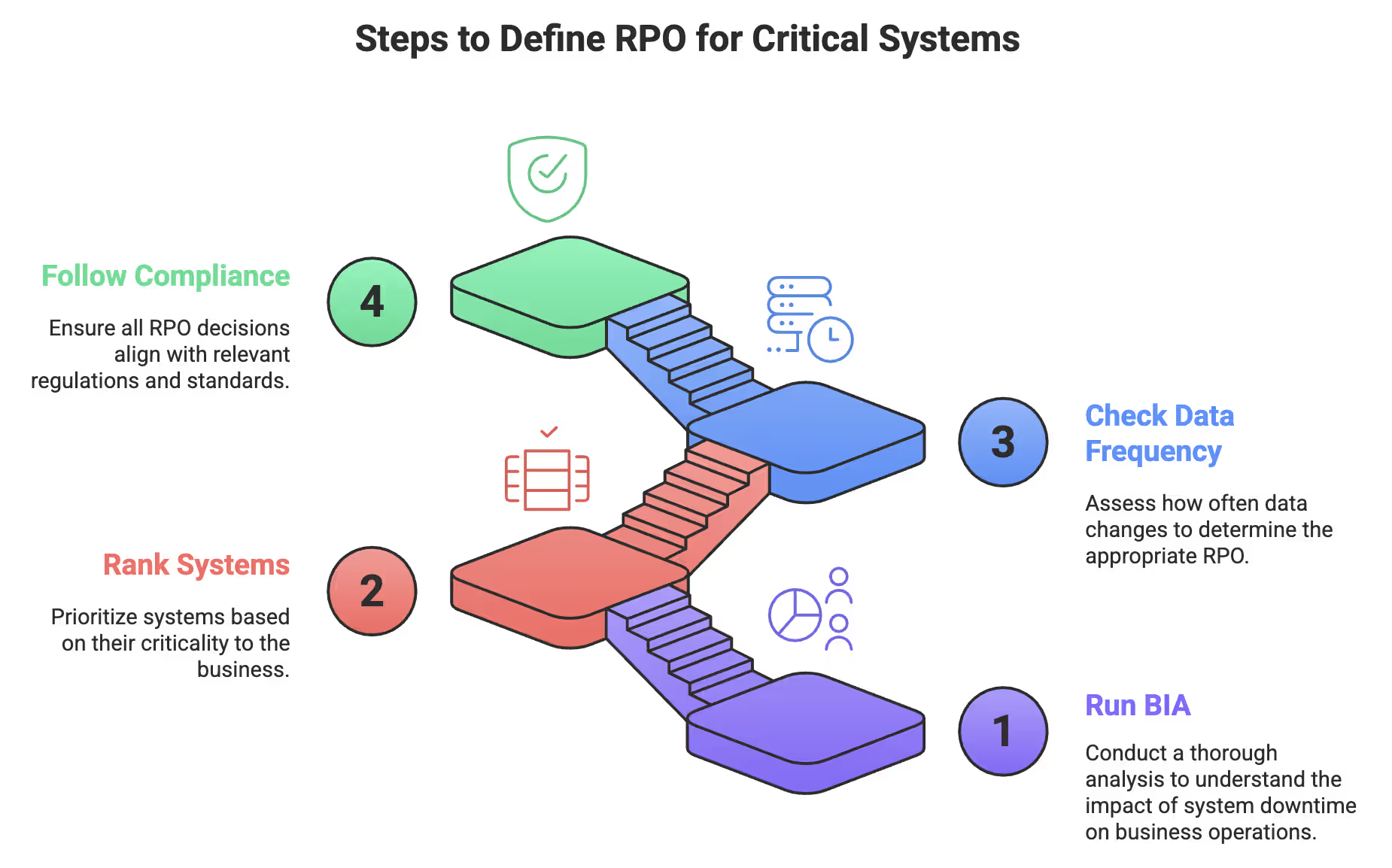
Steps to define RPO for critical systems
Getting your recovery point objectives right isn’t rocket science, but it takes some careful planning:
-
Run a Business Impact Analysis (BIA): Identify what actually keeps your business running, not just what seems important.
-
Rank systems by priority: Point-of-sale crashes? That’s a 5-minute RPO. Marketing dashboard down? One hour might be enough.
-
Check data change frequency: If data updates constantly, daily backups won’t protect you.
-
Follow compliance rules: Certain industries already set strict RPO requirements.
Companies that nail these steps see roughly 60% reduction in downtime during real disasters. That’s preparation, not luck.
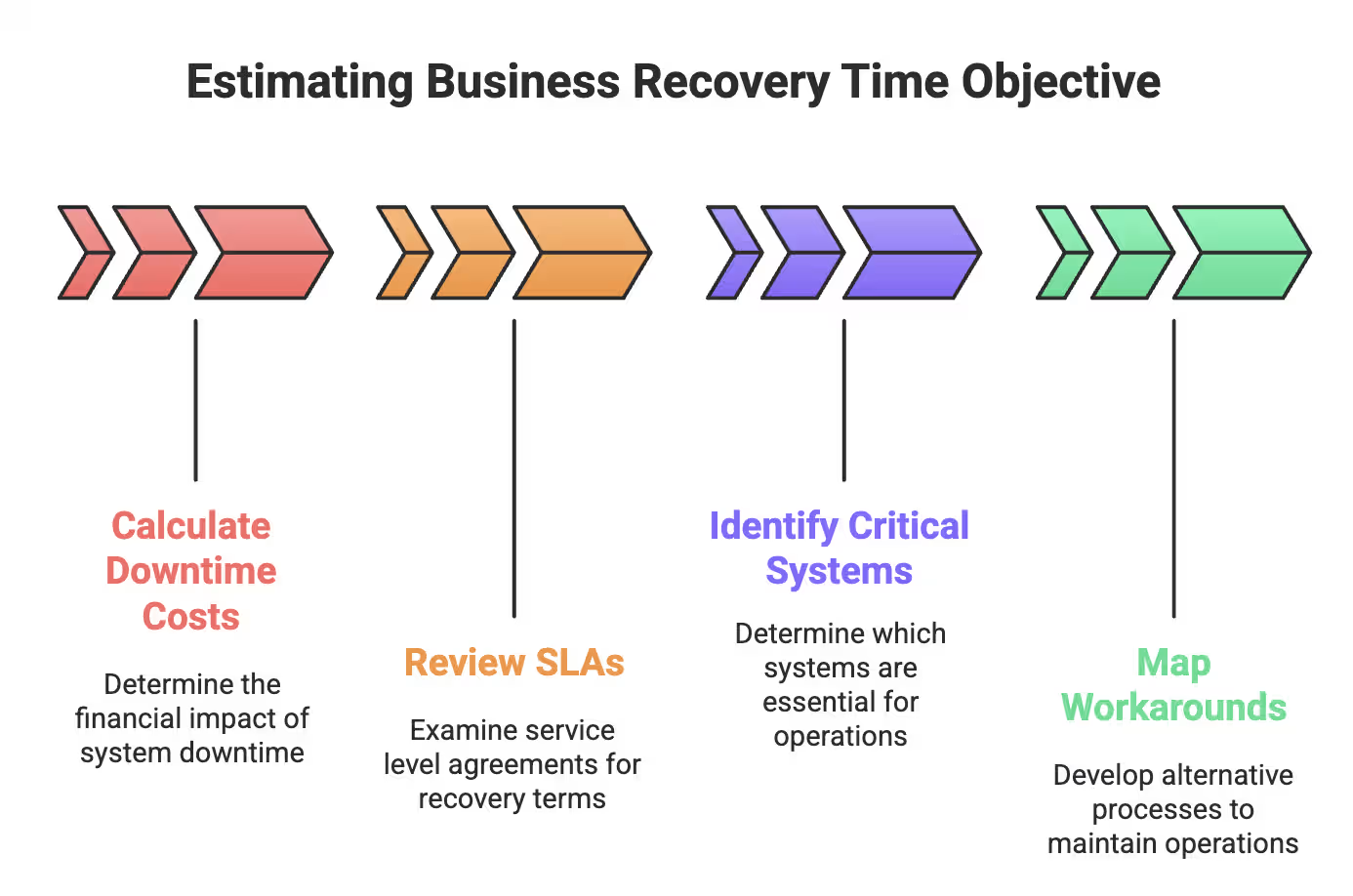
Estimating business recovery time objective
RTO planning is all about numbers:
-
Calculate downtime costs: Per minute, hour, or day—you might be shocked by the figures.
-
Review SLAs: Make sure you can deliver on what you promised to customers.
-
Identify critical systems: Which systems absolutely must be restored first?
-
Map workarounds: Can employees work manually while systems recover? If yes, you might extend your RTO slightly.
Aggressive RTO targets come at a cost—more redundancy, more automation, more infrastructure.
Using past incidents to refine RPO/RTO
Your mistakes are the best teachers:
- Analyze past incidents: They reveal real vulnerabilities.
- Run disaster recovery drills: Systems that seem quick to restore often take longer.
- Adjust expectations: Either improve processes or set realistic targets.
- Keep reviewing: New systems bring new risks, requiring ongoing updates.
Stop guessing. Start measuring. Your future self—and your business—will thank you when disaster hits and you’re fully ready.
Backup Strategies to Meet RPO and RTO
Your backup strategy is where RPO and RTO theory hits reality. Companies that align backups properly cut downtime by ~60% during disasters. The rest scramble and pray.
Backup RPO and frequency planning
Match backup frequency to your tolerance for data loss. Smart companies tier their approach:
- Tier 0 (Critical): RPO under 15 minutes → near-continuous replication or failover clusters
- Tier 1 (Core services): RPO 5–15 minutes → frequent snapshots and image backups
- Tier 2 (Departmental): RPO 30–60 minutes → hourly incrementals plus daily fulls
- Tier 3 (Low-use): RPO 4–24 hours → cost-effective cold storage
First, check how fast your data changes. Constantly updated systems need continuous data protection and near real-time replication.
Disaster recovery time objective and replication choices
Replication method impacts RTO:
-
Synchronous replication: Writes to primary and secondary simultaneously. Zero data loss, slight latency.
-
Asynchronous replication: Allows lag between primary and secondary. Better performance, reasonable RPOs.
Busy e-commerce or SaaS platforms with 15–60 minute RTOs benefit from continuous binlog shipping or streaming replication.
Aligning backups with RTO targets
Backups are half the battle—restoration is the real test.
- Keep recent backups “warm” on fast storage for quick recovery.
- Automate restore scripts—manual restores = mistakes and delays.
- Use automated failover to shift operations instantly.
Brutal truth: many companies have daily backups but never test restores. Their real RTO? Unknown. Test restores regularly. Your future self will thank you.
Real-World Examples of RPO and RTO in Action
Time to get real. Here’s how recovery point objective (RPO) and recovery time objective (RTO) work when disaster hits.
Incremental vs full backups for critical databases
Your backup choice directly impacts RPO:
- Incremental backups: Only capture changes since last backup—faster, leaner, storage-friendly.
- Full backups: Copy everything—slower and resource-heavy.
- Differential backups: Capture changes since the last full backup.
Financial institutions rely on incremental backups for critical databases. They hit tight RPO targets without consuming massive storage or bandwidth.
Auto-switch to failover servers during an outage
Automated failover transforms RTO:
- Healthcare organizations cut downtime from hours to minutes with smart detection and switching.
- Systems flip to backup instantly, keeping patient records accessible.
- DRaaS solutions handle failover automatically, restoring operations in minutes.
No more manual panic when systems fail.
Using offsite backups to reduce downtime
Offsite backups are crucial for meeting tight RPOs:
- Companies with strict RPOs survive major disasters thanks to offsite storage.
- Regular offsite backups beat manual processes for preventing data loss.
- Cloud solutions offer geographic spread and auto-scaling without headaches.
They’re your last line of defense when everything local goes dark.
Simulating disaster recovery using test incidents
Testing is essential:
- DR drills prove whether RPO and RTO targets work in real-world scenarios.
- Run quarterly drills and extra tests after major infrastructure changes.
- Tools like AWS Fault Injection Simulator intentionally break systems to test recovery.
Because finding out your plan fails during a real disaster? That’s not a plan—that’s a prayer.
Best Practices for Maintaining RPO and RTO
Here’s the truth: most companies set their RPO and RTO once—and forget. Big mistake. Your business changes. Your systems evolve. Your recovery targets must evolve too. If you ignore this, your disaster recovery plan is just theory, not protection.
Updating RPO and RTO as systems evolve
Recovery planning isn’t “set it and forget it.” Smart companies:
-
Review RPO and RTO metrics quarterly, with deep annual evaluations to account for growth and changes.
-
Reassess immediately after major upgrades, expansions, or new compliance rules.
-
Keep recovery documentation current whenever systems, software, or processes change.
Skip this step? That “5-minute RTO” could easily turn into three hours when disaster strikes.
Training teams on recovery procedures
A perfect plan on paper means nothing if your teams can’t execute. What actually works:
- Spell out exactly who does what during recovery.
- Create clear team structures with documented roles and responsibilities.
- Run tabletop exercises so new hires know the drill and veterans stay sharp.
Unclear roles = chaos. Don’t let it happen to you.
Regularly testing DR and backup plans
Here’s a scary stat: 7% of organizations never test disaster recovery. That’s like having a fire escape you’ve never tried—could work, could be a dead end.
Smart testing includes:
- Mixing planned tests with surprise “game day” scenarios.
- Tracking actual recovery times against targets for real insights.
- Testing individual components as well as full-scale drills to find gaps early.
Without testing, your RPO and RTO are just wishful thinking. Test regularly, learn from mistakes, and adapt—because when disaster strikes, preparation is everything.
Conclusion: Aligning RPO and RTO With Business Goals
What separates companies that survive disasters from those that don’t? Smart RPO and RTO planning. Companies that get both right cut downtime by up to 60% when chaos strikes. That’s not luck—it’s preparation.
Your backup strategy can’t be one-size-fits-all. Mission-critical systems need near-continuous protection. Less critical data? Daily backups might suffice if you can tolerate a 24-hour loss.
Here’s what to do now:
- Treat data according to importance—some deserves better protection than others
- Test recovery plans regularly—7% of companies never test at all
- Review RPO and RTO targets quarterly as your business grows and changes
- Track actual recovery times during tests, not just targets
- Train your teams properly—a plan is worthless if no one knows how to execute it
Disasters happen—cyberattacks, human errors, natural events. The consequences of poor planning are steep: lost revenue, damaged reputation, frustrated customers. Protect your data, protect your business, and invest in solid RPO and RTO strategies now—or pay the price later.
Reduce business risk and protect critical systems with UprootSecurity — align your compliance, security controls, and recovery readiness to minimize downtime and data loss.
→ Book a demo today
Risk & Vendor Management