Audit Trail Guide: Everything You Need to Know

Robin Joseph
Senior Security Consultant

Ever wondered who’s been snooping around your digital files? Or why a system crashed last Tuesday at exactly 3 PM?
In today’s digital-first world, every action leaves a trace. Every login, file edit, access request, or failed attempt quietly drops a breadcrumb. Individually, they seem harmless. Together, they tell a story. That story is your audit trail.
Modern systems don’t just process data — they remember it. Who did what. When it happened. Where it came from. And how it was done. Whether it’s a finance team updating payroll, a developer pushing code, or a nurse opening a patient record, every interaction creates a permanent digital footprint.
Organizations rely on these records more than ever. In fact, nearly a third already depend on in-app audit systems to understand user behavior and catch privacy issues before they spiral into breaches.
Audit trails aren’t background noise. They’re the difference between guessing what happened and knowing — with proof. And as regulations tighten and threats grow smarter, that difference matters more than ever.
What Is an Audit Trail and Why It Matters?
An audit trail is a chronological, tamper-resistant record of activities within a system. Think of it as a security camera for your digital operations — always on, always watching. Knowing the audit trail meaning shows why these logs are crucial for tracking every system action.
A strong audit trail captures the full picture: who performed an action, what they did, when it happened, where it originated from, and how it was executed. These records are automatically logged and stored securely, creating an unbroken chain of evidence that can’t be altered after the fact.
Why does this matter? Because when something goes wrong — and eventually it will — audit trails turn chaos into clarity. They help organizations investigate incidents, detect fraud, prove compliance, and hold users accountable.
They also act as a deterrent. When people know their actions are traceable, risky behavior drops. From financial reporting to healthcare privacy to GDPR compliance, audit trails aren’t just helpful — they’re foundational to trust, security, and operational integrity.
Types of Audit Trails Across Industries
Different industries, different rules. Different risks, different consequences.
You can’t track a hospital’s patient records the same way you monitor a bank’s payroll system. Each industry uses audit trails differently, shaped by regulations, threat models, and the kind of damage a single mistake can cause.
Audit Trails for Electronic Health Records (EHRs)
Healthcare doesn’t get room for error. One slip with patient data can trigger lawsuits, regulatory penalties, and real-world harm.
That’s why EHR audit trails are extremely detailed. They track:
- Every login attempt and user authentication
- Exact access timestamps
- All document changes — edits, corrections, deletions
- Workstation and device details
HIPAA requires these logs to be retained for at least six years. More importantly, they must be tamper-proof. Once recorded, they can’t be altered or erased.
Because in healthcare, “the logs were missing” is never an acceptable excuse.
Audit Trail in Software and Web Applications
Software audit trails act like a security guard that never looks away.
They log:
- File creation, edits, and deletions
- Successful and failed login attempts
- Data exports and downloads
- System and configuration changes
These logs aren’t just for catching malicious behavior. They’re critical when systems fail. When apps crash or data disappears, audit trails reveal whether it was user error, misconfiguration, or a system fault.
Without it, you’re guessing. And guessing doesn’t scale.
Accounting Records That Provide the Audit Trail for Payroll
When money is involved, audit trails become non-negotiable.
Payroll systems track:
- Payment amounts with precise timestamps
- Voided or deleted transactions
- Transaction status changes
- Who made each change and when
This isn’t overkill. It’s protection. When salaries are delayed, misrouted, or altered, audit trails provide answers — fast. Employees trust their paychecks to be right. Audit trails are how you prove they are.
Audit Trail in Cyber Security Environments
This is where audit trails turn critical.
Security-focused audit trails monitor:
- Admin activity and privilege changes
- Failed logins and access denials
- System changes like VM creation or software installs
- Unusual access patterns that signal attacks
When breaches happen — and they do — these logs become forensic evidence. They show how attackers got in, what they touched, and where defenses failed.
Without detailed audit trails, security teams are flying blind in a threat landscape that keeps getting smarter.
Audit Trail Process: How Audit Trails Work End to End
Most people think audit trails just happen — like magic. They don’t. Behind every clean log and investigation-ready record is a deliberate, end-to-end process designed to ensure nothing slips through the cracks. No mystery. No guesswork. Just method.
These are the core steps that make an audit trail work:
- Data capture and event logging
- Log structure and timestamping
- Secure storage, retention, and immutability
- Monitoring, review, and reporting
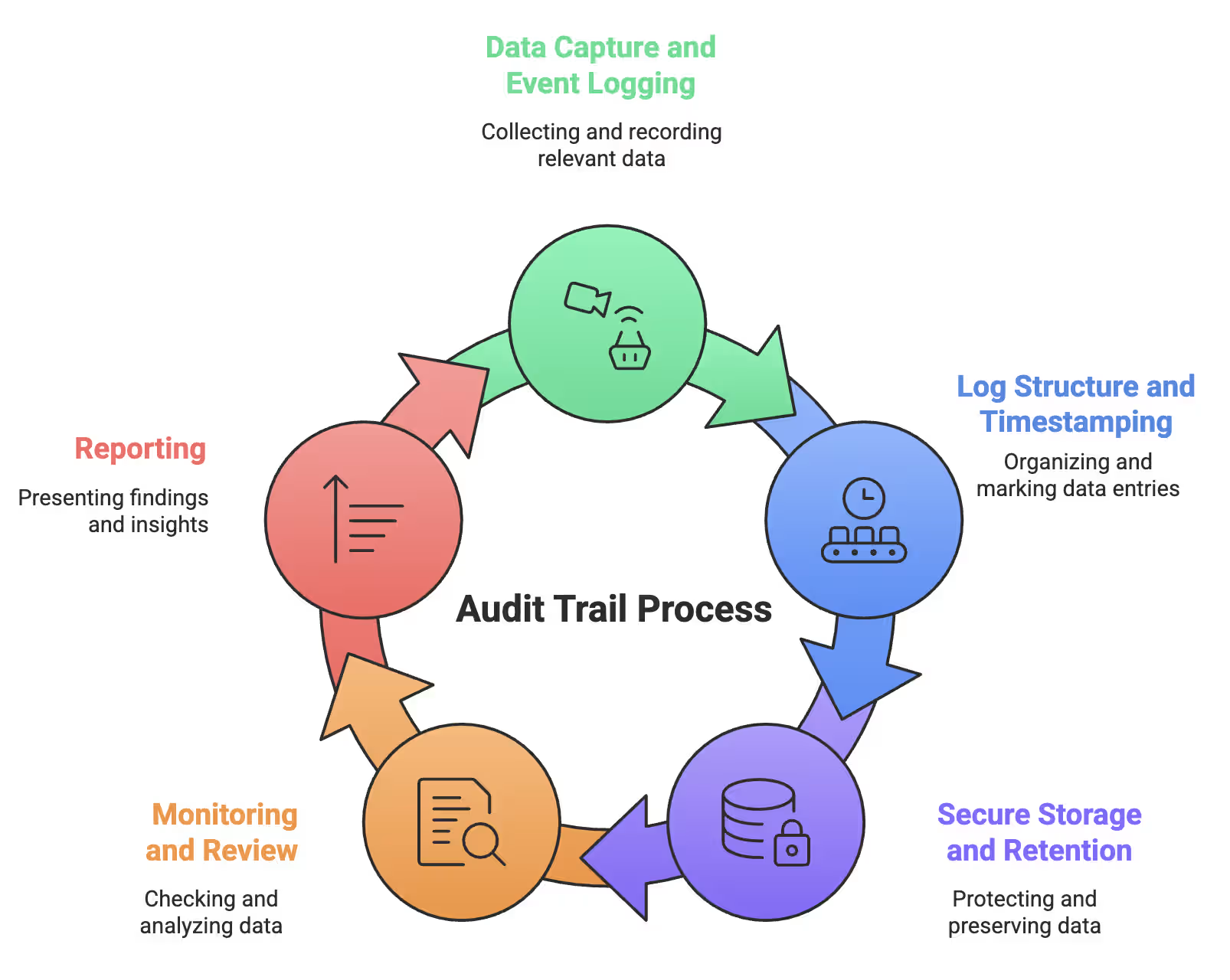
Let’s get into the steps.
1. From Data Capture to Event Logging
The moment an action happens — a login, file edit, deletion, or failed access attempt — the system records it automatically. No human input required.
Think of it as an assistant that never blinks. Every interaction triggers an event log in real time.
Most systems capture:
- Successful and failed login attempts
- Data creation, modification, and deletion
- System startups, shutdowns, and crashes
- Software installs and configuration changes
Some environments go deeper, tracking command execution or system responses. It may feel excessive — until you’re investigating suspicious activity and need every detail.
2. Audit Trail Log Structure and Timestamps
Raw data is useless without structure.
Each audit record follows a consistent format that answers four critical questions:
- When did it happen? (timestamp)
- Who did it? (user or service account)
- What triggered it? (action or command)
- What was the outcome? (success or failure)
Accurate timestamps are non-negotiable. Systems synchronize clocks using Network Time Protocol (NTP). Without synced time, even minor drift can break incident timelines and investigations.
3. Storage, Retention, and Immutability
Once captured, audit data must be locked down.
Retention rules vary — healthcare logs often require six years, financial systems closer to seven — but one rule never changes: logs must be tamper-proof.
Organizations protect audit data using:
- Write-once-read-many (WORM) storage
- Digital signatures to detect tampering
- Encrypted storage with strict access controls
If audit logs can be altered, they can’t be trusted.
4. Monitoring, Review, and Reporting
Capturing logs is only the beginning. What matters is what you do next.
Modern systems generate massive volumes of audit data, making manual review impractical.
Instead, automated monitoring flags issues like:
- Failed login spikes
- Privilege or role changes
- Unusual access to sensitive data
- Unexpected system or configuration changes
This turns raw logs into actionable insight — helping teams detect issues early and support investigations, audits, and compliance reporting.
How Audit Trails Support Compliance and Regulations
Regulations aren’t suggestions — they’re the law. Audit trails are no longer optional. Miss documentation requirements, and fines, penalties, or worse could sink your company. Strong audit trails turn compliance from a headache into verifiable proof of accountability.
Audit Trail GDPR Requirements and Data Privacy
GDPR made data privacy a serious business. Organizations must maintain precise records of all personal data processing:
- Who accessed data and when
- Evidence of consent for processing or sharing
- Transparent records proving responsible handling
GDPR doesn’t mandate exact logging methods but stresses accountability — something audit trails deliver perfectly. Logs must be stored securely for required periods and protected from tampering.
HIPAA Audit Trail Mandates in Healthcare
Healthcare organizations handling ePHI face strict HIPAA rules:
- Application trails: track creation, reading, edits, and deletions of ePHI
- System trails: monitor logins, devices, and applications
- User trails: record user activity within ePHI systems
Retention? At least six years, sometimes longer. Access? Restricted to authorized IT personnel only.
SOX and Financial Audit Trail Obligations
Sarbanes-Oxley enforces accountability for public companies:
- Section 302: CEOs and CFOs must certify financial statements
- Section 404: Mandatory internal control assessments
- Audit trails must prove integrity across every transaction
Penalties for falsifying records? Up to $5 million in fines and 20 years in prison.
The benefit: solid audit trails simplify audits, provide strong legal defense, and demonstrate operational excellence. Companies that master them don’t just stay compliant — they gain trust from regulators, investors, and customers alike.
Benefits of a Strong Audit Trail System
Audit trails aren’t just compliance boxes — they’re business superpowers disguised as logs. They help detect fraud, improve accountability, streamline audits, and protect data integrity.
Fraud Detection and Prevention
Scare fraudsters by showing you’re watching. Every login, file access, and transaction leaves a permanent footprint. Audit trails spot suspicious logins, unusual transaction patterns, and changes to sensitive systems. Employees think twice when their actions are recorded. The audit trail silently prevents issues before they escalate, protecting against internal and external threats.
Improved Accountability and Transparency
Audit trails create a transparency-driven workplace. When people know their actions are documented, they naturally follow rules. Mistakes happen — but logs point directly to what occurred and who was responsible. No finger-pointing. No excuses. Clear accountability makes teams more responsible and organizational operations more reliable and trustworthy.
Streamlined Audits and Legal Defense
Audits don’t have to be painful. Well-structured audit trails cut review times by up to 40%, freeing hours for actual business work. Legal challenges? Logs act as a digital lawyer, providing unchangeable, objective evidence of exactly what happened and when. They simplify compliance reporting, strengthen internal controls, and offer proof during disputes, giving organizations confidence under scrutiny.
Disaster Recovery and Data Integrity
Audit trails act as insurance for your data. Crashes, hacks, or server failures? Logs help rebuild systems quickly. They reveal vulnerabilities early, preventing small issues from becoming major disasters. Complete audit records maintain data integrity, operational resilience, and uninterrupted business continuity.
Audit trails aren’t just about avoiding problems — they turn routine logs into essential tools for smarter, safer, and more accountable business operations.
How to Implement an Audit Trail System
Ready to set up your own digital detective? Implementing an audit trail system isn’t rocket science, but it’s not plug-and-play either. Most organizations either log everything (hello, storage costs!) or too little, missing critical events. The key is balance: capture essential actions without drowning in noise and ensure your logs remain actionable, readable, and tamper-proof.
Selecting the Right Audit Trail Software
Don’t rely on polished demos alone. Focus on essentials:
- Completeness: Captures actions across all devices and browsers
- Tamper resistance: Logs cannot be altered after recording
- Review workflows: Adjustable review periods based on risk
- Critical event coverage: Tracks key events like master data changes, approvals, and system modifications
Pro tip: Ask vendors to demonstrate real-world handling of edits, overrides, and specification changes. Organizations with standardized systems reduce review times by up to 40%, making the upfront effort worthwhile.
Access Control and User Activity Tracking
Every user needs a unique account. Shared logins make audit trails nearly useless.
- System admins: full access
- Security officers: monitor security-related events
- Compliance officers: access regulatory-relevant logs
- Regular users: no access
Real-time monitoring using User Activity Monitoring (UAM) tools detects suspicious patterns instantly. Waiting until a monthly review is like closing the barn door after the horse has bolted.
Integrating Audit Logs Across Systems
Audit trails must cover your entire tech stack — cloud, on-premises, and hybrid environments. Centralized logging provides a unified view across platforms.
Checklist for integration:
- Align user identities across all modules
- Keep identifiers consistent between systems
- Build search tools by user, time, or transaction batch
Integration takes longer than most expect, but done right, it creates an end-to-end, tamper-proof audit trail that defends against internal and external threats, simplifies audits, and provides full operational visibility across your organization.
Real-World Audit Trail Examples and Use Cases
Time for some real talk. These aren’t theoretical boardroom scenarios — these are actual situations where audit trails saved the day, caught someone red-handed, or prevented costly mistakes before they escalated. Understanding these examples makes it obvious why audit trails aren’t optional.
Audit Trail Example in QuickBooks
QuickBooks tracks nearly everything. Both Desktop and Online versions log:
- Every transaction change with user ID and timestamps
- User sign-ins, setting updates, and edits to customers or vendors
- Two years of activity accessible to administrators
- “Indirect edits” affecting multiple records at once
Smartly, QuickBooks creates system profiles like “Online Banking Administration” and “System Administration” to track automated changes. This gives full visibility even when robots or background processes make changes, ensuring nothing slips through unnoticed.
Audit Trail in Web Applications for User Actions
Web apps act as digital detectives, capturing:
- Chronological logs of all user interactions
- Detailed activity for logins, data exports, and edits
- System-wide configuration changes
These logs are more than compliance tools — they’re essential for troubleshooting. When something goes wrong, the audit trail allows teams to reconstruct exactly what happened and determine whether it was human error, a misconfiguration, or a system failure.
Tracking Changes in Financial Ledgers and Transactions
Audit trails are heroes in finance:
-
A controller spotted a $50,000 revenue entry posted incorrectly and corrected it before financial statements went out
-
An accounts payable manager identified a deleted $3,200 vendor payment, preventing a payroll disaster
-
During an IRS audit, a small business used its audit logs to prove all transactions were legitimate, satisfying the auditor immediately
Think of audit trails as digital receipts. They prove who did what, when, and where — except unlike paper receipts, these never fade, get lost, or go missing. They create permanent, verifiable records that keep your systems accountable and your business protected.
Final Thoughts on Building a Reliable Audit Trail
Audit trail technology isn’t standing still. Companies are already building the next generation of tracking systems that make today’s tools look ancient. AI and machine learning are becoming standard — 83% of businesses plan to invest more in automated audit solutions.
The future is clear:
- Smart analytics: Spot threats faster than ever
- Blockchain: Unbreakable, tamper-proof logs
- Instant alerts: Real-time monitoring reduces response time
- One-stop visibility: Logs from every system in a single view
- Automated compliance: Cuts manual audit prep by 60%
Understanding audit trails isn’t optional. Regulations tighten, penalties soar, and small businesses remain vulnerable — 76% of cyberattacks target companies under 250 employees.
The good news? Cloud-based audit solutions are cheaper and more powerful every day. Audit trails aren’t just keeping pace — they’re leading the charge in security, compliance, and operational trust.
Continuous Compliance & GRC Ops