GRC Software Pricing: What Automation Tools Cost

Robin Joseph
Senior Security Consultant
Ever notice how GRC software pricing feels like a state secret? You click through polished websites, watch slick demos, and scan endless FAQs — yet the one thing you actually need, the price, is nowhere to be found.
Behind the marketing gloss, the reality is simple: organizations are racing toward GRC because manual compliance is slow, chaotic, and expensive to sustain. The market reflects that urgency, reaching $50.72 billion in 2025 as companies shift toward automation and continuous compliance.
But GRC cost remains deliberately unclear. Costs vary wildly based on company size, deployment model, features, integrations, and licensing structures. Legacy platforms often push six-figure deals, while newer automation-first tools promise faster value with different pricing models.
If you’re evaluating GRC tools in 2025, understanding how vendors actually price their platforms matters just as much as the features themselves — because hidden costs, not capabilities, are what usually break budgets.
What Is GRC Software?
GRC software — short for Governance, Risk, and Compliance — is the system organizations use to keep risk under control, prove compliance, and make security decisions without chaos. Instead of tracking policies in spreadsheets, risks in email threads, and audits in shared folders, GRC platforms centralize everything into one structured environment.
At its core, GRC software connects three realities every company faces: how decisions are governed, how risks are identified and managed, and how regulatory requirements are continuously met. Modern platforms automate evidence collection, monitor controls, track vendor and operational risk, and help teams prepare for audits without scrambling at the last minute.
But GRC tools aren’t just compliance trackers. Done right, they become operational visibility systems — showing leadership where exposure exists before it turns into incidents, fines, or failed audits. In 2025, GRC software is less about paperwork and more about building repeatable, scalable trust.
Top GRC Automation Tools and Their Pricing Models
Let’s skip the sales gloss and get into what matters: what these GRC tools actually cost and how their pricing models really work. These are the platforms shaping the 2025 market — and what you’ll pay to use them.
Here are the top GRC platforms worth considering:
- Uproot Security
- Hyperproof
- Drata
- RSA Archer
- ServiceNow GRC
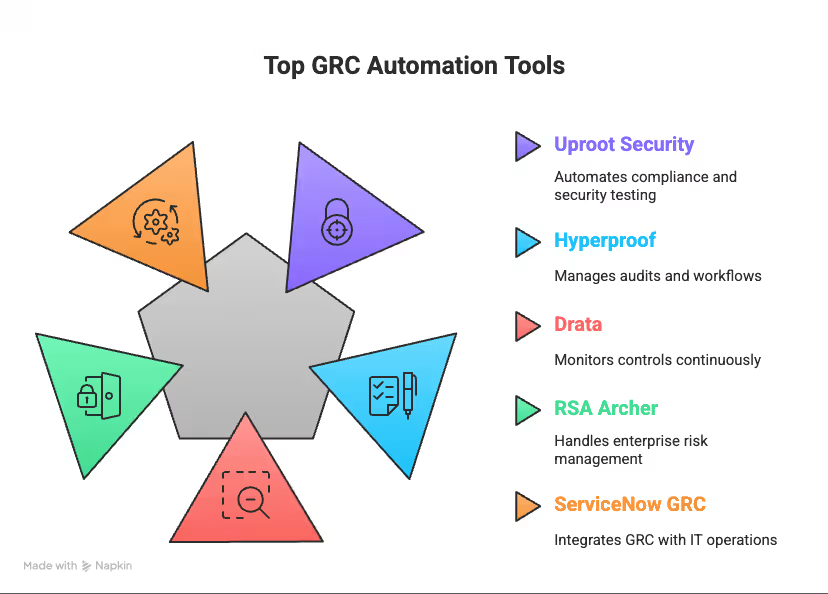
Now, let’s break down GRC automation pricing across top platforms.
1. Uproot Security
Uproot Security is a transparency-first platform built for teams that want compliance automation and real security testing.
Key Features
- SOC 2, ISO 27001, HIPAA, PCI automation
- Cloud and infrastructure monitoring
- Risk and vendor management
- Annual pentesting in every plan
Pricing
- Starter: 1 framework, up to 30 employees, pentest for 1 app — $10,000/year
- Growth: 3 frameworks, up to 100 employees, 2 pentests, Trust Center, AI vendor assessments — $20,000/year
- Enterprise: 5 frameworks, up to 500 employees, 3 pentests, dedicated engineer, 24/7 SLAs — $30,000/year
- Also offers a unique Pay-Per-Vulnerability model where you pay only for real findings.
Ideal For
Teams that want predictable pricing without hidden add-ons.
2. Hyperproof
Hyperproof is a compliance operations platform centred on workflows and multi-framework management.
Key Features
- Automated evidence collection
- 110+ frameworks supported
- Audit workflow orchestration
Pricing
- Starts around $12,000 per year
- Standard plans average $800 per month
- Enterprise ranges from $22,500 to $54,060 annually
- One-time onboarding fee of about $10,000
- Pricing increases with frameworks, workflows, and integrations.
Ideal For
Organizations running multiple audits across teams or business units.
3. Drata
Drata is known for its strong automation and continuous monitoring for security frameworks.
Key Features
- Continuous control monitoring
- Automated tests and integrations
- Vendor and risk management
Pricing
- Foundation starts at $7,000–$7,500 per year
- Advanced is around $15,000 per year
- Enterprise ranges from $25,000 to over $50,000
- SOC 2 Type 1 audits cost $7,500–$15,000
- SOC 2 Type 2 audits cost $12,000–$20,000
- Additional charges for employees, frameworks, and custom API integrations.
Ideal For
Companies needing automated monitoring and external audits.
4. RSA Archer
RSA Archer is a heavyweight GRC suite built for deep customization and enterprise governance.
Key Features
- Complex workflows
- Multi-module governance
- Enterprise reporting
Pricing
- Base suite begins at $55,000
- Single-user subscriptions cost $12,000 per month
- Multi-year contracts start around $180,000
- Implementations frequently exceed $100,000–$300,000
- Pricing scales sharply with modules, customization, and deployment model.
Ideal For
Highly regulated enterprises with large, cross-functional risk programs.
5. ServiceNow GRC
Designed for organizations already operating on the ServiceNow ecosystem.
Key Features
- Real-time dashboards
- Policy, risk, and audit automation
- AI-assisted insights
Pricing
- Starts at $50,000 per year
- Offered in Standard, Professional, and Enterprise tiers
- Uses an all-employee pricing model
- Costs increase with vendor risk modules, workflows, and total employee count
- Full deployments often reach $150,000–$250,000 annually.
Ideal For
Enterprises wanting GRC and IT operations unified in one environment.
To make this even easier, here’s a quick GRC software comparison table showing how each tool stacks up on pricing.
| Vendor | Starting Price | Enterprise Range / Extra Costs | Key Pricing Notes | Deployment |
|---|---|---|---|---|
| Uproot Security | $10,000/year | Scales by frameworks & pentests | Pricing based on number of frameworks and employee size | Cloud |
| Hyperproof | ~$12,000/year | $22,500–$54,060/year; $10k onboarding | Workload-based pricing; onboarding fees may apply | Not specified |
| Drata | $7,000–$7,500/year | $25,000–$50,000+; SOC 2 audit fees | Additional audit costs (Type 1 & 2) | Cloud |
| RSA Archer | $55,000+ | $180,000+; high setup costs | Per-module, highly customized pricing | On-prem or SaaS |
| ServiceNow GRC | $50,000/year | $150,000–$250,000 | All-employee pricing model; integration fees | Cloud |
The right GRC tool isn’t about features—it’s about fit. Use this comparison to cut through the noise and choose a platform that strengthens control, simplifies audits, and actually supports how your team works.
Factors Influencing GRC Tool Pricing
GRC platform pricing isn’t determined by software alone. Deployment choices, user access, automation depth, integrations, and support requirements shape total cost, often turning simple quotes into long-term financial commitments once implementation begins.
Deployment model and infrastructure
How you deploy your GRC platform defines your cost structure from day one. Cloud tools rely on subscription pricing that looks predictable but grows as usage expands. On-premise deployments require large upfront licenses, maintenance contracts, and internal IT resources. Enterprise environments almost always need customization, and every adjustment adds cost. In some cases, perpetual licensing becomes cheaper long-term despite higher initial investment.
Number of users and access levels
User access is where pricing quietly escalates. Per-user fees range from $500 to $15,000 per seat, while some vendors charge based on total employee count or restrict admin privileges to premium tiers. StandardFusion, for example, charges $15,000 per month for just three users — roughly $5,000 per user. Without early forecasting, growing teams can trigger rapid cost increases after contracts are signed.
Feature set, automation level, and customization
Automation directly impacts pricing tiers. Basic compliance tracking costs less, while advanced analytics, workflow orchestration, and real-time dashboards introduce enterprise-level pricing. Customization becomes the hidden risk. Tailored workflows often require ongoing vendor involvement and create maintenance challenges whenever updates roll out, making native functionality the more cost-stable option.
Integration with existing systems
Integrations frequently become hidden cost centers. Connecting GRC platforms to HR systems, cloud apps, ticketing tools, or asset inventories can cost between $5,000 and $50,000 or more depending on complexity, API limitations, and vendor participation during implementation.
Support, training, and SLAs
Licensing is only part of the bill. Maintenance alone consumes 17%–22% of license costs annually. Training ranges from $250 to $120,000 depending on organization size, while implementation support typically adds $20,000–$35,000. Without proper onboarding and support, even powerful GRC platforms risk becoming expensive shelfware.
Breakdown of GRC Pricing Models
Confused by GRC pricing models? You’re not alone. Vendors have invented more ways to charge you than a parking meter company. Here’s the real breakdown so you know what you’re actually signing up for.
Subscription-Based Pricing
Cloud-based tools love subscriptions — it’s their favorite revenue engine.
Here’s how the model works:
- Monthly or yearly payments based on users, features, or company size
- Tiered packages that quietly nudge you toward “enterprise”
- Entry pricing around $400/month but easily scaling into the thousands
Why organizations pick subscriptions:
- Lower upfront cost
- Predictable budgeting
- Automatic updates and easier scaling
But the trap is simple: recurring fees compound. Risk Cognizance starts at $400/month, while Drata and Vanta charge 40–60% more for similar functionality. Looks manageable at first… until month 12.
Perpetual Licensing
Perpetual licensing is old-school but still very alive. You buy once, you own it, usually on-prem.
Here’s what that really means:
- One-time license fee
- Maintenance and upgrades sold separately
- Heavy reliance on internal infrastructure
Where it wins:
- Better for long-term (5+ years) users
- Full control over deployment and security
- No subscription creep
Where it hurts:
- Large upfront investment
- Updates aren’t free
- Risk of running outdated software
- Implementation tends to be slower and costlier
Vendors like RSA Archer offer both models — because different teams tolerate cost in different ways.
Usage-Based Pricing
This one feels refreshing: pay only for what you actually use, with costs tied directly to activity.
You’re charged based on:
- API calls
- Data volume
- Compliance activity
- Storage consumption
Why it works:
- Costs track real operational needs
- Low barrier to entry
- Clear visibility into usage patterns
But here’s the catch: usage spikes = bill spikes, especially during audits, seasonal peaks, or unexpected compliance workloads. It’s flexible, but your budgeting needs discipline.
Custom Enterprise Pricing
Enterprise buyers get tailor-made pricing designed around their complexity and scale.
What vendors factor in:
- User counts across regions
- Integration depth
- Custom workflows
- Support requirements
It’s flexible but complex. Negotiations stretch longer, costs vary wildly, and long-term maintenance (often 17–22% yearly for tools like SAP GRC) adds another predictable but heavy layer to your total spend.
Choose wisely — each model hits your budget in a different way.
Hidden Costs in GRC Software and Automation Implementation
Think the sticker price is all you’ll pay for GRC automation tools?
Think again.
The real costs show up after you’ve signed the contract — and by then, you’re locked in.
Setup and onboarding expenses
Here’s where vendors quietly drain your budget:
- Implementation services balloon fast, especially when enterprise deployments need customization
- Data migration costs spike with every policy, record, and audit trail you need moved
- Initial configuration depends on how chaotic your current processes are
- Hardware requirements hit hard if you’re running on-premise
One Reddit user nailed it: “Year one was great… year two, price went up 40% and service disappeared.”
Classic bait-and-switch. Hook you low, trap you high.
GRC training and certification costs
Nobody tells you this upfront: your team won’t know how to use these tools.
Training isn’t optional — it’s survival.
- Basic packages start at $250 and climb to $12,000 for larger teams
- Per-employee training runs $18–$30 annually
- Certifications like GRCP cost extra
By company size:
- Up to 100 employees: ~$250
- 100–500: ~$1,000
- 500–1,000: ~$2,000+
- 1,000+: $4,000–$12,000
SOC 2 compliance cost considerations
SOC 2 alone can implode a budget. Total costs range from $7,500 to $100,000+ depending on complexity.
Additional hits include:
- Gap assessments: $5,000–$25,000
- Policy creation
- Penetration testing: $5,000–$15,000
- Security training
Startups should budget $20,000–$60,000, including audit fees and tool subscriptions.
Consulting and advisory fees
Your team doesn’t know GRC implementation. Consultants and external GRC services providers do — and they’re not cheap.
- Average rate: $63/hour
- Typical project (3–4 months): $20,000–$35,000
- Entry consultants: $50/hour
- Senior experts: $75+/hour
These aren’t “nice to have.” They’re unavoidable.
Maintenance, upgrades, and workflow changes
The bleeding doesn’t stop after go-live.
- Annual maintenance: 17–22% of license cost
- Workflow adjustments = extra charges
- Admin support becomes a recurring tax
Professionals spend 31% of their time fighting these tools instead of using them.
The truth? The upfront price is maybe half of your real investment.
Before signing anything, calculate full total cost of ownership — or you’ll pay for it later.
Tips for Choosing the Right GRC Software
Choosing GRC software isn’t about chasing the most feature-packed platform. It’s about selecting a solution your organization can realistically operate, scale, and sustain without introducing unnecessary complexity or long-term financial strain.
Define Your Real Compliance Needs First
Start by identifying the frameworks and risks that actually apply to your organization today. Many teams overspend by planning for hypothetical future requirements. A focused platform aligned with current compliance goals improves adoption, reduces setup complexity, and delivers measurable value faster than oversized enterprise solutions.
Prioritize Pricing Transparency
Always look beyond headline pricing. Ask how costs change with additional users, frameworks, integrations, or support tiers. Transparent pricing models help forecast long-term spending, while vague enterprise quotes often hide onboarding fees, customization costs, and scaling expenses that appear after implementation begins.
Evaluate Usability and Workflow Simplicity
A GRC platform only works if teams consistently use it. Complex workflows increase administrative burden and slow compliance execution. Choose tools that simplify evidence collection, automate repetitive tasks, and fit naturally into existing processes rather than forcing teams to adapt to rigid systems.
Check Integration and Automation Capabilities
Strong integrations reduce manual effort and prevent data silos. A capable GRC platform should connect easily with cloud environments, HR systems, ticketing tools, and identity platforms. Automation ensures controls stay continuously monitored, reducing audit preparation stress and improving ongoing risk visibility.
Think Long-Term Scalability and Ownership
Short-term savings can lead to long-term costs. Evaluate training needs, maintenance effort, and scalability as your organization grows. The right platform adapts alongside your compliance maturity, avoiding expensive migrations or workflow redesigns as operational complexity increases.
Choosing the Right GRC Automation Tool Without Overspending
Choosing the right GRC automation tool isn’t about chasing the biggest platform or the longest checklist. It’s about understanding what your organization actually needs — and what it can realistically support without burning through budget, bandwidth, or sanity.
Most teams overspend because they underestimate the hidden layers: onboarding, migration, certifications, audits, upgrades, and the ongoing “admin tax” that shows up long after go-live. The sticker price is never the real price, and vendors count on that.
So the real advantage isn’t picking the flashiest tool. It’s choosing one with transparent pricing, predictable scaling, and workflows your team can actually manage. A tool that automates the work instead of creating more of it.
If you strip away the noise, GRC success comes down to fit, flexibility, and long-term cost control. Your tool should bend around your processes — not the other way around. Because in the end, the smartest GRC investment is the one that protects you today and doesn’t punish you tomorrow.
Turn chaotic compliance into predictable, scalable security with UprootSecurity — the smarter way to stay compliant without the burnout.
→ Book a demo today
Continuous Compliance & GRC Ops