A trust center is a web page or portal where a company shares its security, privacy, and compliance information with customers.
It is where a buyer's security team goes to check you before they sign. Instead of emailing your team for a SOC 2 report or a list of subprocessors, they find it in one place, some of it public and some of it behind an NDA.
This guide covers what a trust center is, what to put on it, what to keep gated, how to build one step by step, and how to tell if it is working.
What Is a Trust Center?
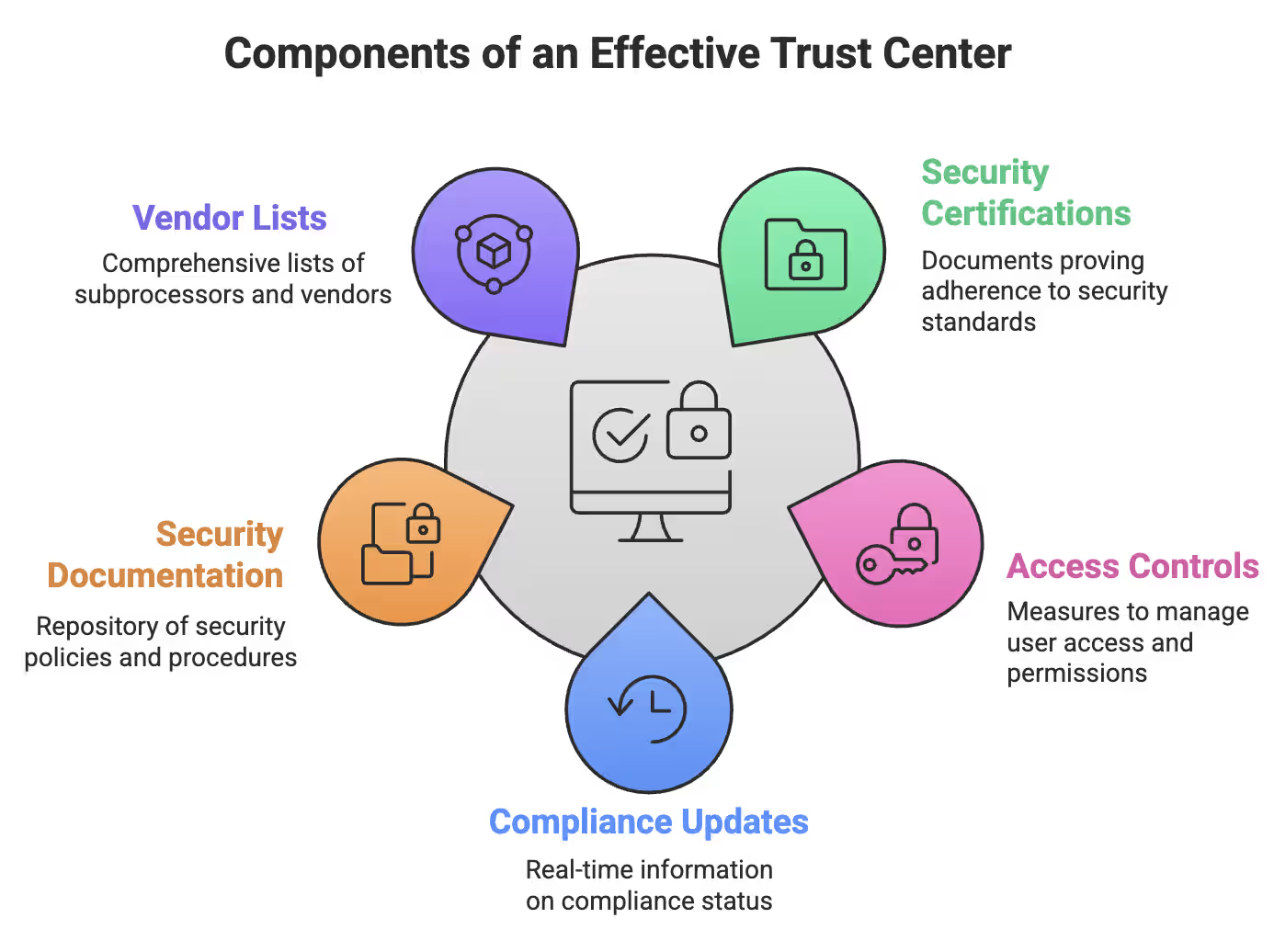
A trust center is a single, customer-facing home for the proof that you protect data. It usually holds your certifications and audit reports, security and privacy policies, a list of the vendors that handle customer data, and answers to common security questions.
You will also see it called a trust portal, trust page, security portal, or trust centre (the British spelling). They all mean the same thing.
But a trust center isn't just a static webpage filled with downloadable PDFs. Good trust centers are kept current, and many connect to compliance tools so the status of your controls updates on its own.
What Is a Trust Center Portal?
A trust center portal is the gated part of a trust center, where approved visitors sign an NDA or log in to download sensitive documents. The public page shows what you have. The portal is where buyers get the full reports, with every access logged and controlled.
Types of Trust Centers
Trust centers grew out of separate security, privacy, and legal pages. Some companies still keep these apart, while others combine them into one.
| Type | What it covers | Who reads it |
|---|---|---|
| Security trust center | Certifications, audit reports, security controls, pentest summaries | Security and IT reviewers |
| Privacy center | Privacy policy, data rights requests, subprocessors | Privacy teams and end users |
| Legal center | Terms of service, data processing agreement (DPA), SLAs | Legal and procurement teams |
| Unified trust center | All of the above in one place | Everyone in the buying group |
For most B2B software companies, a unified trust center is the best choice. Security, legal, and procurement teams all review you, and one link serves all of them.
What Is the Purpose of a Trust Center?
The purpose of a trust center is to let customers check your security on their own, so security reviews stop slowing down deals. It does several jobs at once:
- Shorter security reviews: buyers get reports and answers on day one, not after a week of email.
- Fewer repeat questions: the same questions come up in almost every review. Answer them once, in one place.
- Less work for your team: sales shares one link instead of asking security to find the latest PDF.
- Visible maturity: a clear, current trust center shows buyers that your security program is real and maintained.
- One source of truth: everyone, inside and outside the company, sees the current version of each document.
A trust center is also a big part of how you earn customer trust in B2B, because it turns security claims into proof a buyer can check.
What to Include in a Trust Center
Structuring your trust center isn't about uploading every internal document. It's about deciding what's public, what's gated, and how much depth buyers need to move forward with confidence.
| Content | Public or gated | Why it matters |
|---|---|---|
| Certifications and frameworks (SOC 2, ISO 27001, HIPAA, GDPR) with dates | Public | The first thing reviewers look for |
| Security overview: hosting, encryption, backups, access control | Public | Answers the most common questions |
| Subprocessor list | Public | Shows who handles customer data and where |
| Security FAQ | Public | Answers routine questionnaire questions in advance |
| Vulnerability disclosure policy and security contact | Public | Tells researchers how to report issues |
| System status and incident updates | Public | Shows reliability and openness |
| Full SOC 2 report and ISO 27001 Statement of Applicability | Gated (NDA) | Contains detailed control information |
| Penetration test executive summary | Gated | Proves testing without exposing weaknesses |
| Detailed policies (incident response, business continuity) | Gated | Internal detail that reviewers may ask for |
| Architecture and data flow diagrams | Gated | Sensitive technical detail |
| Completed standard questionnaires (SIG, CAIQ) | Gated | Answers many reviews with one file |
| DPA, terms of service, SLA | Public or gated | Needed by legal and procurement |
Public-Facing Security Information
Your public section should establish credibility without exposing sensitive details. Display active certifications like SOC 2 and ISO 27001 with clear issuance dates. Provide high-level overviews of encryption standards, infrastructure providers, and backup practices.
Publish your subprocessor list with defined vendor roles and data responsibilities. Include security contact details and a responsible vulnerability disclosure process. Keep it clean. Keep it controlled. Transparency builds trust, but oversharing creates risk.
Gated Compliance Documentation
Some materials require verification before access. Behind an NDA wall, place detailed audit reports, complete policy libraries, and technical documentation used during formal evaluations.
Include architectural diagrams, data flow summaries, standardized questionnaires like CAIQ or SIG, and penetration test summaries that demonstrate rigor without exposing vulnerabilities. Use watermarking and time-bound access links to maintain control. Smart gating protects both your organization and your prospects.
Security FAQ: The Questions Buyers Ask Most
The same questions show up in almost every security review. Answer them on your trust center in plain words:
- Where is customer data hosted?
- How is data encrypted in transit and at rest?
- How are vendors and subprocessors vetted?
- How are backups handled and tested?
- Can customer data be deleted upon request?
- Do you use single sign-on and multi-factor authentication?
- Do employees get security awareness training?
- Do you maintain formal vulnerability management and regular policy reviews?
Answer these clearly and upfront. When common concerns are resolved early, reviews move faster, and confidence builds naturally.
Incident Response Communications
Your trust center shouldn't go silent when incidents happen. It should become your single source of truth.
Publish timely, transparent updates outlining impact, remediation steps, and next actions. Clear communication reduces speculation and reinforces control. Anyone can claim security on good days. The real test comes under pressure, and how you communicate defines lasting trust.
How to Build a Trust Center, Step by Step
You can build a useful trust center in a few weeks if your compliance documents already exist. Here is how to build a trust center in seven steps. Start small, then add to it.
1. Gather Your Security Documents
List what you already have: audit reports, certificates, policies, pentest summaries, the subprocessor list, and past questionnaire answers. Note the date of each one, and refresh anything out of date before it goes live.
2. Decide What Is Public and What Is Gated
Use the table above as a starting point. A simple rule: if it helps a buyer and could not help an attacker, make it public. Everything else goes behind an NDA.
3. Choose Where It Will Live
Most companies host it at a subdomain like trust.yourcompany.com, or a page like yourcompany.com/trust or /security. You can build it on your own website or use trust center software, which adds NDA signing, access approvals, and analytics.
4. Set Up Access Control for Gated Documents
Decide who can see gated files and how they get access. Common options are click-through NDAs, approval by sales or security, and time-limited links. Log every download so you have a clear audit trail.
5. Write Your Security FAQ
Pull the most common questions from your past security questionnaires and answer each one once, clearly. This is the part of a trust center that usually saves the most time.
6. Keep It Current
A trust center showing an expired certificate does more harm than having no trust center. Assign an owner, review it every quarter, and update it after every audit, new subprocessor, or policy change. Connecting it to continuous compliance monitoring keeps control status current without manual work.
7. Tell People It Exists
A trust center only helps if buyers find it. Link to it from your website footer, security page, and sales emails. Train sales to send the link at the first sign of a security review, and add it to proposals and RFP responses.
Examples of Trust Centers
Large software companies have run trust centers for years. A few worth studying:
- Microsoft Trust Center: covers security, privacy, and compliance across Microsoft's cloud products, with audit reports available through its Service Trust Portal.
- Salesforce Trust: combines live system status with security and compliance information, so customers can check availability and certifications in one place. trust.salesforce.com
- Atlassian Trust Center: organized around resilience, security, compliance, and AI, with a separate trust portal for vendor risk documents. atlassian.com/trust
- Slack Trust Center: covers privacy, security, compliance, data management, and AI principles, plus a form for privacy requests. slack.com/trust
You do not need anything this big. A smaller company can start with one page: certifications, a short security overview, the subprocessor list, a security FAQ, and a request form for the SOC 2 report. That covers the core of what to include in a trust center at the start.
Trust Center vs Security Questionnaires
A trust center does not replace security questionnaires, but it cuts how many you get and how long they take.
Smaller customers often accept a trust center and a SOC 2 report instead of a questionnaire. Large enterprises and regulated companies usually still send their own questionnaire, because their process requires it. Even then, a trust center helps: your answers already exist, and reviewers can check the evidence themselves.
Keep your trust center FAQ and your questionnaire answers in sync, so buyers never get two different answers to the same question. Our security questionnaire response guide covers how to handle the ones you still receive.
How Trust Centers Help After the Sale
A trust center is not only for new deals. It keeps working through the whole customer relationship:
- Onboarding: a new customer's IT and security teams find setup and security details without opening tickets.
- Renewals: many customers re-check their vendors every year. A trust center with this year's report makes that review quick.
- Customer audits: when a customer's own auditor asks about your controls, you send one link.
- Incidents: customers already know where to look for updates.
Trust Center vs Traditional Security Documentation
Traditional security documentation drains time through scattered files, endless emails, and version confusion. Trust centers replace that chaos with structure, speed, and controlled transparency.
With traditional documents, every request interrupts someone. Static PDFs go out of date the moment they are sent, and old versions keep circulating. With a trust center, buyers serve themselves, every document shows its current version, and you can see who viewed what.
| Feature | Traditional Documentation | Trust Center |
|---|---|---|
| Access | Endless emails, manual approvals | Self-serve, automated, instant |
| Updates | Static PDFs, outdated info | Live dashboards, real-time status |
| Organization | Scattered files everywhere | Centralized, controlled hub |
| Efficiency | Slow, error-prone, frustrating | Fast, streamlined, frees teams |
| Visibility | Hard to track, no audit trails | Full analytics, engagement logs |
| Risk | Confusion, inconsistencies, delays | Accurate, reliable, continuously maintained |
What to Look for in Trust Center Software
You can build a trust center as a page on your own website, but trust center software makes gating, updates, and tracking much easier. Look for:
- NDA and access workflows: click-through NDAs, approval rules, and time-limited links.
- Live control status: a connection to your compliance platform, so certifications and control status update automatically.
- Document control: version history, watermarking, and expiry dates.
- Analytics: who visited, which documents they opened, and when.
- Integrations: your CRM (such as Salesforce or HubSpot) and Slack, so sales can see trust center activity on each deal.
- Questionnaire help: a searchable answer library or automation for the questionnaires you still receive.
- Your branding and domain: so it looks like part of your website.
If you already use a compliance automation platform, check whether it includes a trust center. That way the evidence you collect for audits feeds the trust center directly, and you avoid paying for and maintaining two tools.
Measuring Trust Center Impact and ROI
You can measure a trust center by how much faster security reviews close and how often buyers use it. Track these numbers:
- Security review time: days from the first security request to approval, before and after launch.
- Questionnaire volume: how many questionnaires you receive, and how many deals close with the trust center alone.
- Engagement: which prospects request access, and which documents they open most.
- Deal influence: the share of won deals where the buyer used the trust center.
- Time saved: hours your security team no longer spends on document requests.
Engagement data is also a sales signal. A prospect downloading your SOC 2 report is usually deep in evaluation, which helps sales see which deals are moving. Record these numbers for a few months before launch, so you have a baseline to compare against.
Turn Your Compliance Work Into a Trust Center
A trust center is only as strong as the compliance work behind it. Buyers trust it when the reports are current and the controls are really running.
UprootSecurity keeps your SOC 2, ISO 27001, HIPAA, and GDPR controls monitored all year, so the proof on your trust center stays current. The Growth and Enterprise plans include a trust center and questionnaire automation, so you can share reports with buyers and answer security reviews faster. Every plan includes a yearly penetration test, and a dedicated compliance expert guides you from the first gap assessment to the final audit report. You can try it free for 14 days.
Frequently Asked Questions
A trust center is a web page or portal where a company shares its security, privacy, and compliance information with customers. It usually includes certifications such as SOC 2, security policies, a subprocessor list, and answers to common security questions. Sensitive files, like full audit reports, are often shared only after the visitor signs an NDA.
The purpose of a trust center is to let customers check your security and compliance on their own, without waiting on your team. It shortens security reviews, cuts repeat questionnaire questions, and gives everyone the same current documents. It also shows buyers that your security program is real and maintained.
A trust center portal is the gated section of a trust center where approved visitors access sensitive documents. Visitors usually sign a click-through NDA or request approval first. The portal holds files like full SOC 2 reports, pentest summaries, and detailed policies, and it logs who downloaded what and when.
To build a trust center, gather your security documents, decide what is public and what needs an NDA, and choose where it will live. Then set up access control, write a security FAQ from past questionnaires, and assign an owner to keep it current. Finally, link to it from your website and sales emails.
Well-known examples include the Microsoft Trust Center, Salesforce Trust, the Atlassian Trust Center, and the Slack Trust Center. Salesforce combines live system status with compliance information, while Atlassian groups content into resilience, security, compliance, and AI. Smaller companies can start with one page covering certifications, a security overview, subprocessors, and an FAQ.
A security trust center should include your certifications, a security overview, a subprocessor list, a security FAQ, and a way to report vulnerabilities. Behind an NDA, add full audit reports, penetration test summaries, detailed policies, and architecture diagrams. Legal documents like your DPA, plus system status and incident updates, belong there too.
No, a trust center does not fully replace security questionnaires, but it reduces how many you receive and how long they take. Smaller customers often accept a trust center and a SOC 2 report instead. Large enterprises usually still send their own questionnaire, but your trust center answers much of it in advance.
A trust center helps sales teams by giving buyers security proof without waiting on the security team. Sales shares one link at the first sign of a security review, so deals keep moving. Trust center analytics also show which prospects are opening documents, which helps sales see which deals are active.